
Beginner Workflow
Use this path when you are new to Agent Teams and want a clear sequence from "open the app" to "approve useful work".
The first run should prove four things:
- The app can open your project.
- A small team can launch with the selected runtime.
- Tasks move through the board in a visible way.
- You can review and approve changes before they are treated as done.
The basic model
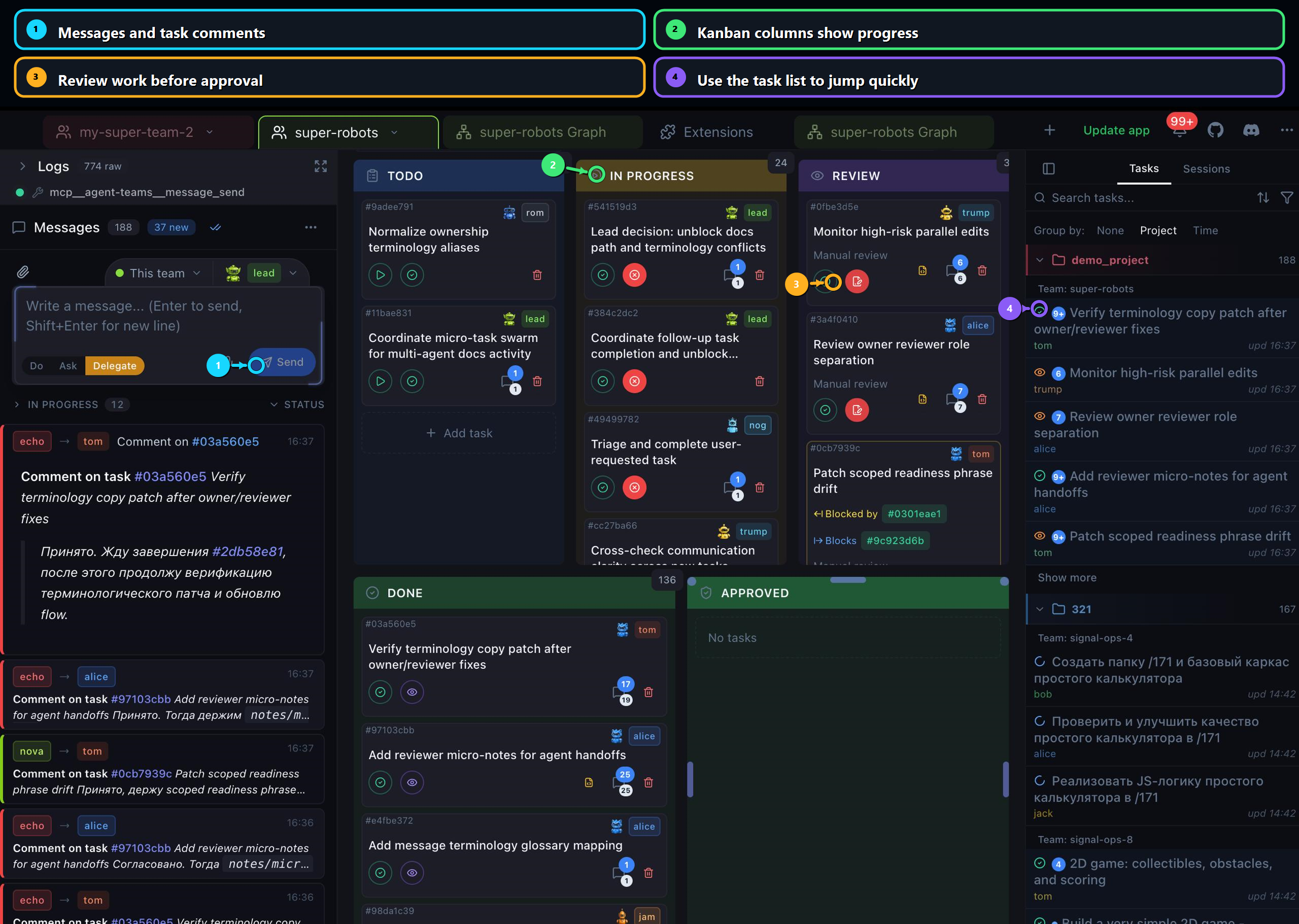
Agent Teams has four working surfaces:
| Surface | What you do there |
|---|---|
| Project and team selector | Pick the project and the team that will work on it. |
| Team editor | Name the team, add members, choose roles, models, and worktree settings. |
| Task board | Watch work move through Todo, In Progress, Review, Done, and Approved. |
| Task detail and review | Read the task, inspect logs, check changes, and approve or request fixes. |
Recommended guide order
Follow these guides in order for the first successful run:
- Create your first team - set up a small lead-builder-reviewer team.
- Run and monitor work - give the lead a concrete goal and watch the task board.
- Review and approve - inspect task details, logs, and code changes.
- Troubleshooting - use this if launch, messages, or task logs do not look healthy.
Before you launch
Start with a Git-tracked project and a known baseline:
git status --shortYou do not need a perfectly clean tree, but you should know which files are already changed. That makes review safer after agents start editing.
For the first run, keep the team small:
| Member | Good first responsibility |
|---|---|
| Lead | Split the goal into tasks and coordinate status. |
| Builder | Implement scoped tasks. |
| Reviewer | Review completed tasks and ask for fixes. |
Avoid launching many teammates at once. More agents increase logs, concurrent edits, provider usage, and review load.
First goal template
Use a goal that has clear scope, boundaries, and verification:
Improve the documentation quickstart. Keep edits inside landing/product-docs, add practical examples, preserve existing VitePress syntax, and run `pnpm --dir landing docs:build` before marking tasks done.Good first goals are specific, testable, and limited to a known area. Avoid prompts like "make the app better" until you understand the workflow.
What healthy progress looks like
During a healthy run:
- The lead creates small tasks rather than one huge task.
- Each teammate posts a plan or progress comment.
- Work moves from Todo to In Progress.
- Finished work moves to Review before approval.
- The task detail shows the description, attachments, changes, and execution logs.
- The final comment includes the verification command and result.
When to intervene
Intervene when a task is vague, too broad, blocked, or missing verification. Use a task comment when the message belongs to one task. Use a direct message when you need to redirect a teammate or the lead.
Common intervention prompts:
Split this into smaller tasks. Each task should have a narrow file scope and a clear verification step.Before continuing, post the files you plan to change and the command you will run to verify the result.This task is too broad. Keep the change inside the docs guide pages and avoid touching app runtime code.Completion checklist
Before you call the first run successful, verify:
- The team launched without runtime errors.
- At least one task moved through Review.
- You inspected the task diff.
- The result comment includes a verification result.
- You understand which files changed and why.
Then continue to Create your first team.