
Create Your First Team
This guide walks through the first team setup. The goal is not to build the biggest team possible. The goal is to create a small team that launches reliably and produces reviewable tasks.
1. Open the target project
Open the project you want agents to work in. Prefer a Git-tracked project so Agent Teams can show diffs, task-linked changes, and review state.
Before launching, check the baseline:
git status --shortIf there are existing user changes, keep them in mind during review. Agent Teams can work in a dirty tree, but review is clearer when you know what existed before launch.
2. Create the team
Use the team selector, then create a new team for the current project. Give it a short operational name, such as docs-onboarding, landing-fixes, or runtime-audit.
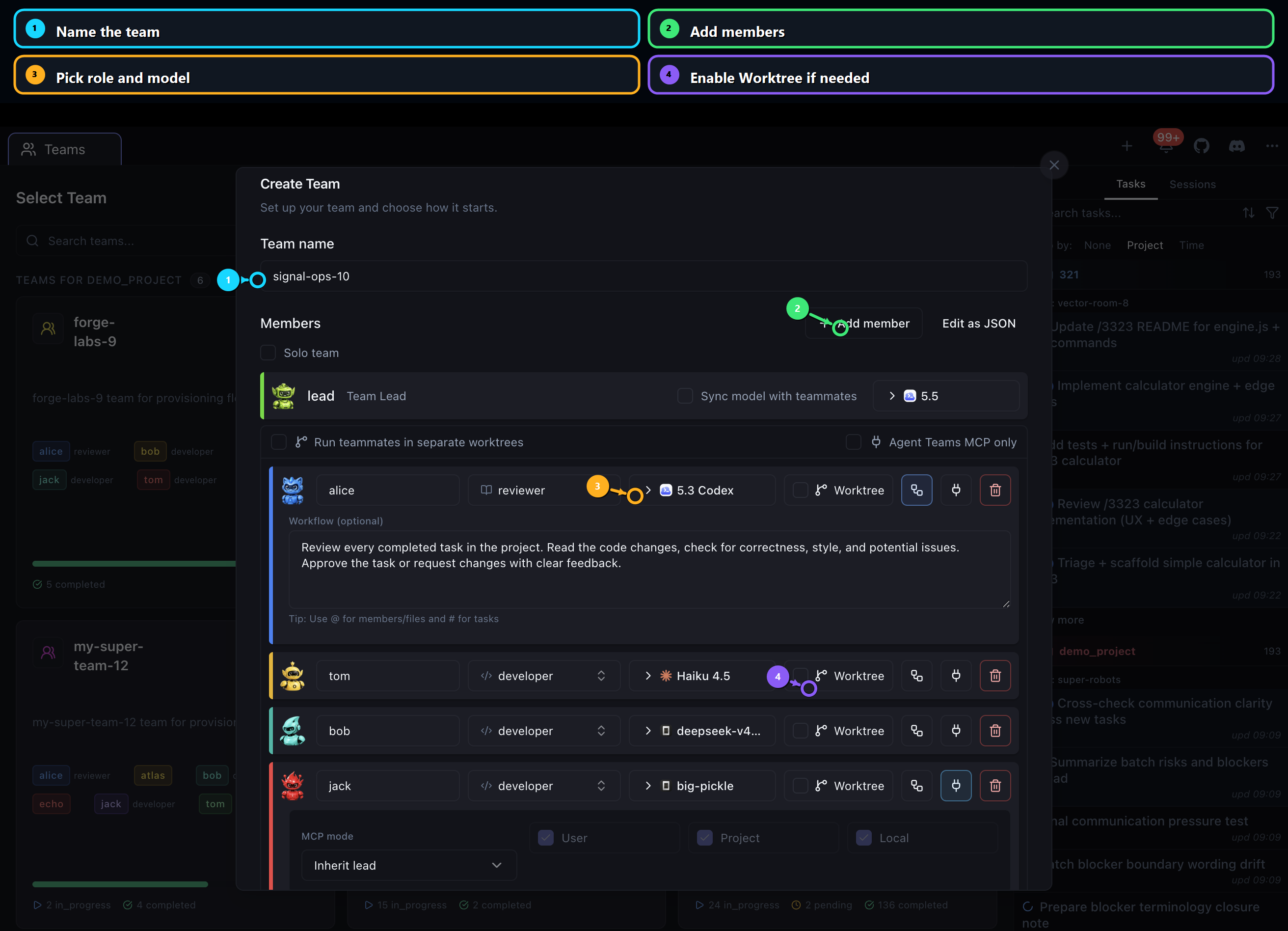
3. Start with three roles
Use this first-team shape:
| Role | Responsibility | Why it helps |
|---|---|---|
| Lead | Splits the goal into tasks, assigns owners, tracks blockers. | Keeps work coordinated. |
| Builder | Implements scoped tasks. | Produces the actual change. |
| Reviewer | Reviews completed tasks and asks for fixes. | Prevents unreviewed output from being treated as complete. |
You can add specialists later. For the first run, a small team is easier to debug and review.
4. Choose provider and model per member
Each member needs a provider and model. Use the most reliable runtime for the lead, because the lead controls task breakdown and coordination.
Common first setup:
| Member | Suggested provider style |
|---|---|
| Lead | The most reliable model you have available. |
| Builder | A fast model that can handle scoped implementation. |
| Reviewer | A careful model with stronger reasoning. |
If a provider is missing, fix runtime setup before launching. See Runtime setup.
5. Decide on Worktree
Enable Worktree when teammates may edit the same repository in parallel and you want Git isolation. Keep it off for a very small first run if you want the simplest setup.
Use Worktree when:
- multiple teammates can edit code at the same time
- you want cleaner diffs per member
- the project is already Git-tracked
Avoid Worktree when:
- the project is not a Git repo
- you are only testing the UI flow
- you want the fewest moving parts for the first launch
6. Write member instructions
Give each member a short workflow. The member prompt should describe responsibility, not the whole project.
Lead example:
Split the user goal into small tasks. Assign clear owners, avoid broad refactors, keep task comments updated, and request review before approval.Builder example:
Implement only the assigned task. Keep changes scoped, post the files you changed, and include the verification command and result before marking work complete.Reviewer example:
Review completed tasks for correctness, regressions, missing tests, and scope creep. Ask for fixes with specific comments before approving.7. Launch with a narrow goal
Use a launch brief with outcome, scope, boundaries, and verification:
Improve the docs onboarding path. Keep changes inside landing/product-docs. Create a beginner-friendly guide sequence, add practical examples, preserve VitePress syntax, and run `pnpm --dir landing docs:build`.8. Confirm the launch is healthy
After launch:
- The lead should create tasks.
- At least one teammate should start a task.
- The board should show movement into In Progress.
- Task comments or logs should show what the teammate is doing.
If launch hangs or no tasks appear, go to Troubleshooting.
Next: Run and monitor work.